Business card dimensions in pixels: the complete size guide
 Jul 24,2026
A founder handing over a business card is a small moment that says a lot. If the file was built at the wrong resolution, the print comes out soft or pixelated, and that small moment works against you instead of for you.
Getting your business card dimensions in pixels right the first time avoids reprints, awkward cropping, and last-minute panic before an event. It’s a five-minute problem to solve, and this guide covers the exact numbers, why they matter, and where a business card fits into a bigger brand system.
We’ll go through the standard pixel size, the DPI math behind it, bleed and safe zones, international variations, and the file settings that keep everything sharp when it goes to print.
What is the standard business card size in pixels?
A standard US business card is 1050 x 600 pixels at 300 DPI. That’s the actual, trimmed size of the card, based on the physical dimensions of 3.5 x 2 inches.
But that number alone won’t get you a clean print. Printers cut physical paper, and no cutting machine is perfectly precise every single time. So your design file needs a bit of extra room around the edges, called bleed, and a safe margin inside the trim line where your text and logo actually live.
If you already have your dimensions sorted and just need a logo and card layout that actually matches the rest of your brand, that’s the part Brandframer handles start to finish, delivered in 48 hours.
What is the best pixel size for a business card at 300 dpi?
For most standard cards, 1050 x 600 pixels at 300 DPI is the number you want in your design software. Some printers request a slightly larger canvas, like 1200 x 600 or 1050 x 650, to leave extra bleed room, so it’s worth checking your specific printer’s upload guide before exporting.
DPI stands for dots per inch, and it’s the measurement that determines print sharpness. At 300 DPI, a 3.5 x 2 inch card multiplies out to 1050 x 600 pixels exactly. Drop below 300 DPI and text can look fuzzy once it’s printed, even if it looked fine on your screen.
A quick way to check your math: multiply the inch dimensions by the DPI. 3.5 inches times 300 equals 1050. 2 inches times 300 equals 600. If your printer asks for a different DPI, just run the same multiplication with their number instead.
What are the bleed, trim, and safe area dimensions in pixels?
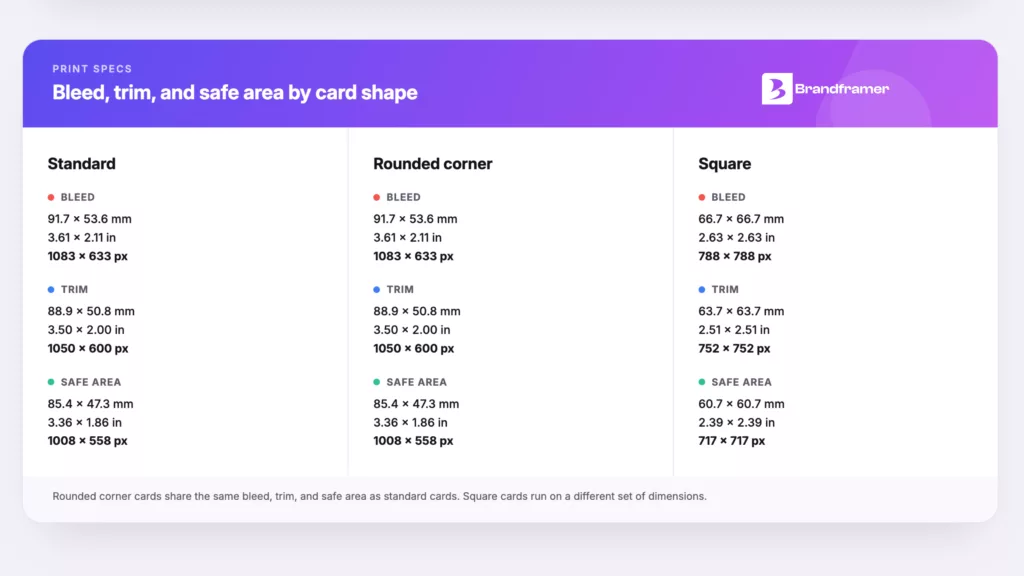
Bleed, trim, and safe area are the three zones that determine whether your card prints clean or ends up with a visible white edge. Trim is the final cut size, which is 1050 x 600 pixels for a standard US card.
Bleed extends beyond that, usually to around 1083 x 633 pixels. Any background color, image, or pattern needs to stretch into this zone, because cutting machines aren’t perfectly centered every time, and a design that stops exactly at the trim line risks a thin white sliver on one edge.
Safe area sits inside the trim line, typically around 1008 x 558 pixels. This is where your name, title, and contact details need to stay. Anything closer to the edge than that is at risk of getting clipped during trimming.
This is the kind of detail that’s easy to get wrong once and expensive to fix after a print run has already shipped. It’s also exactly the kind of spec we’ve built into every card layout across thousands of identity projects, so it’s never something our clients have to think about.
Is a business card the same size as a 3×5 card?
No, a standard business card is not 3×5 inches. That size belongs to index cards, not business cards. A US business card is 3.5 x 2 inches, noticeably smaller and shaped differently than a 3×5 card.
The confusion usually comes from index cards and business cards both being small, rectangular, and easy to carry. But a 3×5 card would feel oversized in a wallet or card holder, which defeats the entire point of a card that’s meant to travel with someone.
If you’re weighing a standard size against something less conventional, like a square or a folded format, that decision is worth making alongside your broader brand identity, not in isolation from it. Related reading: our breakdown of what actually belongs in a brand identity package covers how a business card fits alongside your logo and guidelines.
What are business card sizes in pixels around the world?
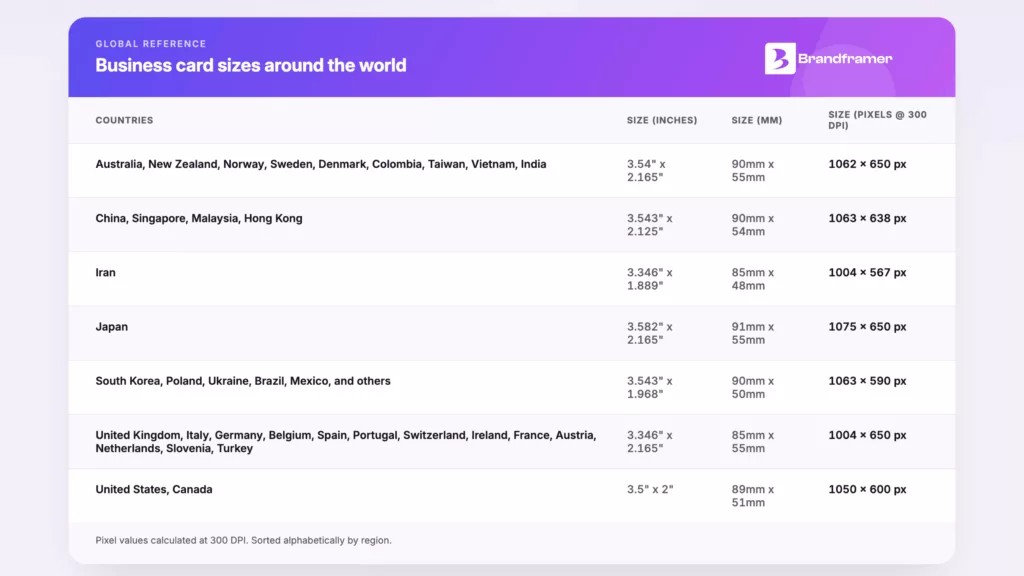
Business card dimensions change by country, and the differences are big enough to matter if you’re printing for an international audience. The US and Canada use 3.5 x 2 inches, which is 1050 x 600 pixels at 300 DPI.
Most of Europe, including the UK, Germany, France, and Spain, uses a slightly narrower 3.346 x 2.165 inches, or roughly 1004 x 650 pixels. Japan runs slightly larger at 3.582 x 2.165 inches, close to 1075 x 650 pixels. China, Singapore, and Hong Kong use 3.543 x 2.125 inches, around 1063 x 638 pixels.
In some regions, particularly the UK, India, and parts of Southeast Asia, you’ll also hear this same object called a visiting card rather than a business card. Same physical item, different name, and worth knowing if you’re checking specs on an international vendor’s site.
Brandframer works with founders across the US, and also serves clients in Dubai, France, and beyond at the same time, not as an afterthought once the US work is done. If your brand needs to hold up in more than one market, that consistency has to be built into the system from day one, not patched together country by country.
How does business card size fit into your brand identity?
A business card is one small, physical piece of a much larger system. And it’s usually the first thing a founder gets wrong, not because the pixel dimensions are hard, but because the card was designed in isolation from the logo, color palette, and typography that are supposed to be sitting right next to it.
Here’s the honest nuance: getting the pixel dimensions exactly right will not save a business card that doesn’t match the rest of your brand. A perfectly sized card with a mismatched logo and inconsistent fonts still reads as unfinished, even if the print quality is flawless.
That’s why the size guide only solves half the problem. The other half is making sure the card, the logo, the website, and everything else a founder hands a customer or investor all come from the same visual system. Our guide on logo design principles covers what makes a mark hold up at business card scale, where there’s no room for a busy or overly detailed logo to breathe.
A business card is one piece of a bigger system that includes your logo, color palette, typography, and guidelines. Brandframer delivers all of it together in 48 hours, so your card is never the one piece that looks like it came from somewhere else.
What file format and resolution should you use for a print-ready business card?
For print, export your business card as a high-resolution PDF or a 300 DPI PNG or TIFF, not a JPEG. Vector formats like AI or EPS are ideal if your printer accepts them, since they scale without any loss in quality.
CMYK is the color mode you want for print, not RGB. RGB is built for screens, and colors can shift unexpectedly when a file set in RGB gets converted to CMYK by a print shop instead of by you.
Exporting at the right resolution is simple once you’re starting from vector source files rather than a flattened logo someone emailed you years ago. That’s exactly what’s included in every Brandframer package: a full set of usable, editable files, so nobody’s stuck re-requesting a logo from a freelancer who stopped responding months ago.
Getting your business card dimensions right is the easy part
The pixel math for a business card takes five minutes to get right: 1050 x 600 pixels at 300 DPI for a standard US card, with bleed and safe zones built in around it. That part isn’t the hard problem.
The harder problem is making sure that card actually looks like it belongs to your brand once it’s in someone’s hand. A technically perfect card with a shaky logo and inconsistent colors still undersells a founder in the room.
Brandframer builds the whole system at once: logo, color palette, typography, and print-ready guidelines, delivered in 48 hours across three fixed-price plans, Basic at $280, Premium at $480, or the full BrandFramer 360 at $987. Ten years and thousands of projects in, we’ve built enough business cards to know that the size was never really the hard part. If you’re ready to fix the whole picture instead of just the pixel count, that’s what we do.